
For shop owners
How to register your shop on ChitralBazaar.com (free)
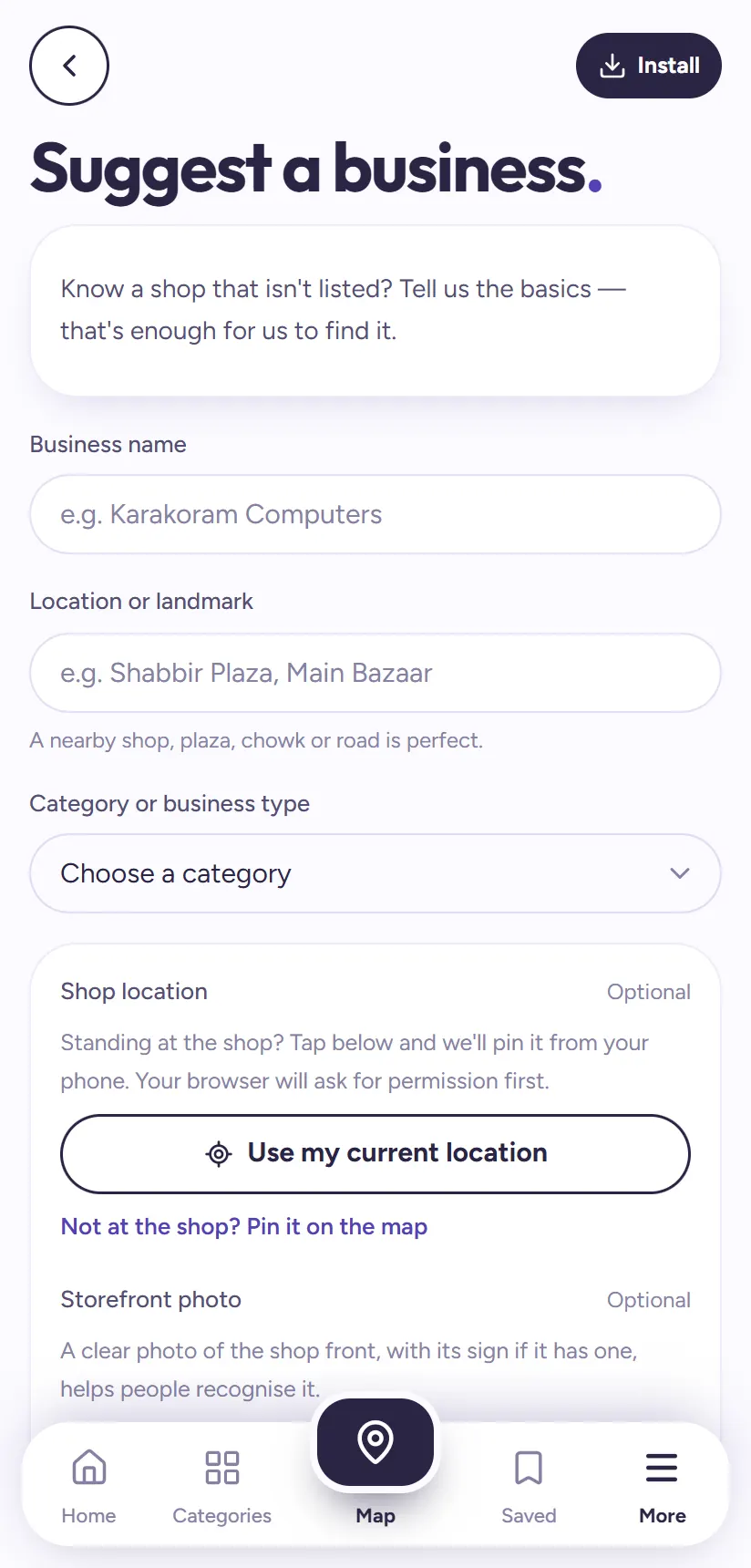
Nearly a thousand shops in Chitral are already on Chitral Bazaar, and people use it every day to find who sells what and to call or WhatsApp them directly. If your shop isn't there yet, customers searching for what you sell can't find you.
Adding a shop is free and takes about two minutes. You can add your own shop, or a shop you know, using the Suggest a shop form.
1First, check your shop isn't already listed
Search your shop's name on chitralbazaar.com. Our team has visited most bazaars and many shops are already listed, sometimes under a slightly different spelling, so try the owner's name or your street too.
If you find it, you don't need to register again. You can claim it and manage it yourself.
2Open the Suggest a shop form
Open the Suggest a shop page. It's also in the More tab and at the bottom of every page. The form asks only for the basics; you can add more details later.
3Fill in the name, landmark and category
Business name: the name on your signboard, for example "Karakoram Computers".
Location or landmark: a plaza, chowk or a well-known shop nearby, like "Shabbir Plaza, Main Bazaar" or "opposite Polo Ground Gate". This is how people will find you in the bazaar.
Category or business type: choose the closest one from the list, such as Bakeries, Mobile Repair, Clothing or Restaurants.
4Pin the location and add a photo (recommended)
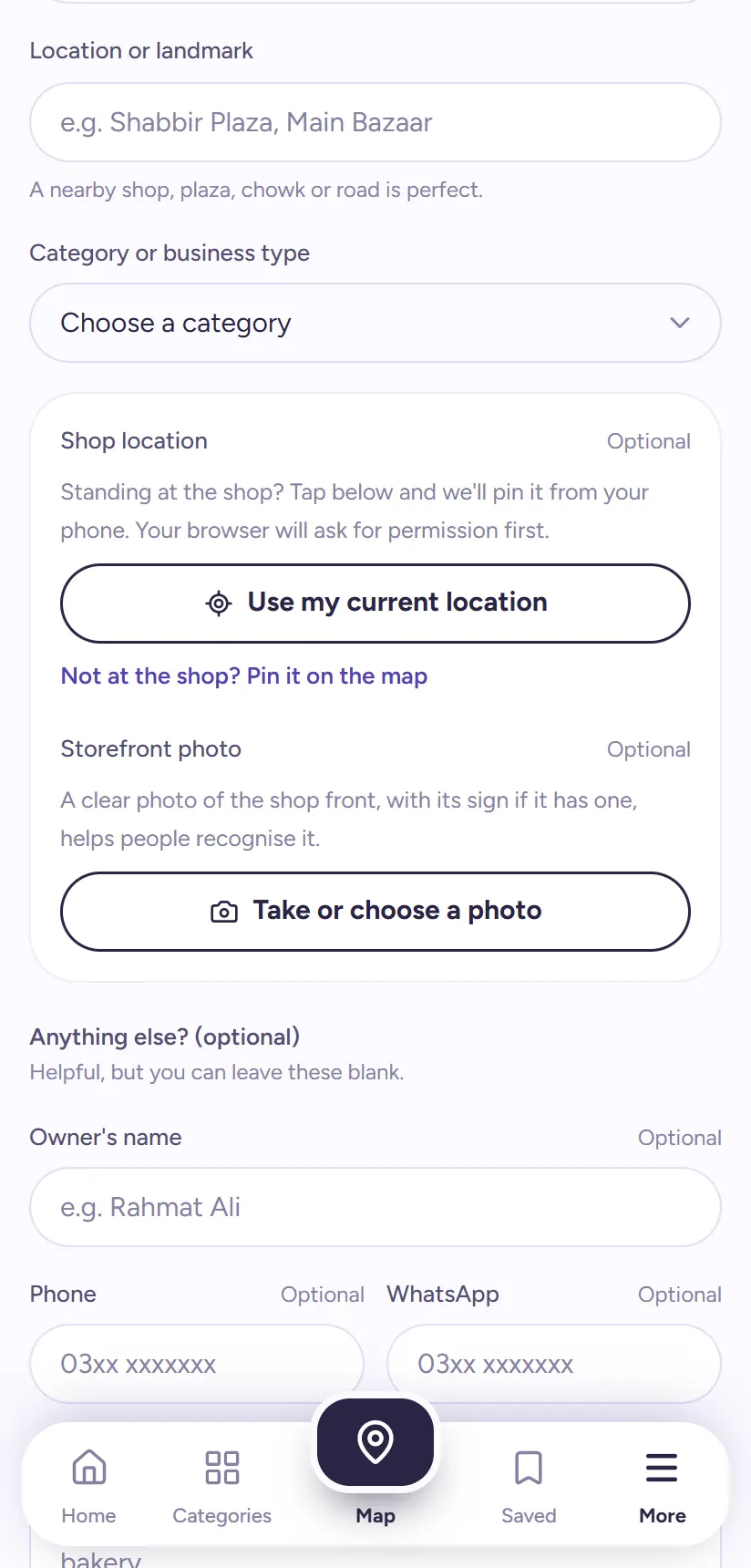
Standing at the shop? Tap Use my current location and the shop is pinned on the map from your phone's GPS. Not there? Tap Pin it on the map and drag the pin to the shop's front door.
Then add a storefront photo: a clear picture of the shop front, with its sign if it has one. A photo helps people recognise your shop in a busy bazaar.
5Add your phone and WhatsApp, then send
Add the owner's name, the shop's phone and WhatsApp numbers, and any notes, for example "opens late", "sells imported parts" or "next to the bakery". These are optional, but a shop with a WhatsApp number gets many more customers.
Tap Send suggestion. You'll see Thanks — we'll take a look.
What happens next
Our team checks every new shop before adding it, so people can trust what they find. This can take a few days. We may call or WhatsApp you to confirm details like your opening hours.
Once your shop is live, people can find it in search, in its category and on the map. Then claim it to manage it yourself: update your hours, photos and contacts, reply to reviews, and see how many people view and call your shop.
Tip: Adding a shop for a friend or relative? Go ahead, the more shops on Chitral Bazaar, the more useful it is for everyone. Just tell them, so they can claim it later.
Two shops, or a branch in another bazaar?
Send a separate suggestion for each shop or branch, with its own landmark and photo. Each one gets its own page, so customers in Main Bazaar and in Purana Bazaar both find the shop nearest to them.
Have many shops to add, for example for a market association or a group of traders? Message our team on WhatsApp from the More tab and we can add them together, or visit your market.
What makes a listing that gets customers
Shops with these details get found and contacted far more often:
- A clear photo of the shop front and sign.
- A WhatsApp number. Most people in Chitral contact shops on WhatsApp first.
- A landmark everyone knows, not just the street name.
- Notes on what you sell, in the words customers use: "school uniforms", "dry fruits", "Infinix screens".
Questions people ask
Does it cost anything to add my shop?
No. Adding a shop to Chitral Bazaar is completely free.
How long until my shop appears?
Our team checks every new shop before adding it. This can take a few days. We may contact you to confirm details.
Can I add a shop that isn't mine?
Yes. Anyone can suggest a shop. The real owner can claim it later and manage it themselves.
My shop is already listed with wrong details. What do I do?
Don't register it again. Claim the shop to edit it yourself, or tap Report on its page and tell us what's wrong.
Can't find a shop?
Tell us about it on the Suggest a shop page, and we'll add it so others can find it too.